Deploying Batch Scale Software
Overview

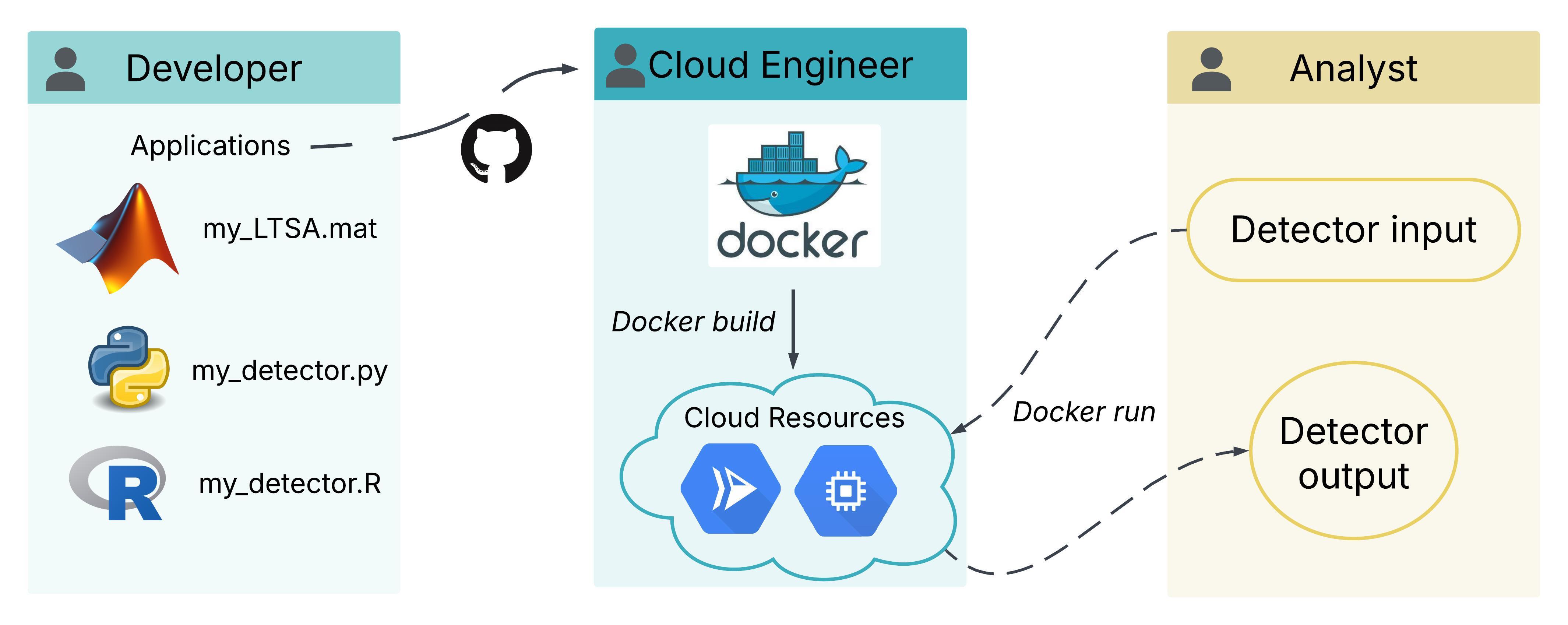
Processing acoustic data in the cloud with a batch framework allows any number of processing jobs to be run simultaneously by any number of analysts. This hyperscaling is possible because cloud resources are independent from the physical infrastructure that limits processing capacity on premise. As a result, batch processing frameworks remove the time bottlenecks associated with processing acoustic data. When running multiple jobs at once, all jobs are processed simultaneously and all jobs will finish at the same time, with the total time to complete equal to that of the longest individual processing job.

Implementing batch frameworks for data processing offers the NOAA passive acoustic community valuable time savings for numerous software types including source-specific detectors and soundscape analysis. Ultimately, this will translate to more efficient generation of acoustic data products that can be used to support conservation and management decisions.

Criteria

Applications or datasets that meet the following criteria could be delivered as a batch process:

  • Jobs can be processed in parallel
  • A lot of data needs to be processed
  • User defined parameters are either fixed or minimally changed (excluding input/output locations which are assumed to be variable)
  • Software can be installed or built from source without user interaction
  • Software can be called as a script or CLI

Accessing batch-scaled software

The cloud development team is leveraging a simplified user interface provided by Google Cloud Composer to submit batch processing jobs. This is currently in development for PyPAM, LFDCS, the multi-species whale ML model, Minke Detector, and North Atlantic Humpback CNN. These models are currently still in the development cloud environment, but will soon be transitioned into our PAM Cloud project. Each software has its own “DAG”, which is a link to a user interface where the analyst provides the required configuration inputs for the software. These inputs vary for each software and will be specified in analysis specific protocols.

Previously, batch-scaled processing jobs were submitted by sending a minimal set of instructions to GCP servers, most conveniently through the PAM GCP Console. We currently have a Minke whale detector and a Humpback detector available in the batch framework, and are working on LFDCS and PyPAM soundscape software. Check out the list of software to be migrated to the cloud and their current status to see what we will be working on next. If you have a priority software that is not listed, please reach out to the cloud team.

How to use

Recieving permissions to run batch processes

Please create an issue on this github. Specify the batch scaled process you wish to have access to, as well as any special output location in the cloud you would like the process to write outputs to directly (if you do not have a preference, there are default locations available). Please share with us the level of effort of your analysis: testing out, full basin deployment, etc.

Running available software in batch

General steps for batch execution code:

  • Make a copy of the below code in a text editor (notepad, notepad++, etc)
  • Customize the parameters of the following script to your liking
  • Copy and paste the customized code into the Google Cloud Console shell (once on the page, click on ‘Activate Cloud Shell’ button on the top right).

Minke detector

The minke detector searches for pulse trains, and so is suitable for the Atlantic minke whale population. To run the minke detector:

###########Start of example

###########parameters (can modify):

OUTPUT_PATH=nefsc-1-detector-output/PYTHON_MINKE/KETOS_v0.2/Raw
DEPLOYMENT_ID='my-new-deployment' #allows us to distinguish different runs by billing/stats. Not needed to change each time in production, but good practice (helps you locate cloud run information if needed)

RECURSIVE=True
EXTENSION=.wav
BATCH_SIZE=512
#BATCH_SIZE=1024 #can comment out parameters you are switching between
CHANNEL=1
SUMMARY_TIME_OFFSET=-5
THRESHOLD=0.1
MIN_CONFIDENCE=0.6
CHUNK_SIZE_SEC=3600

#full cloud path, each item in quotes, separated by space, one or multiple. 
INPUT_PATHS=("nefsc-1/bottom_mounted/NEFSC_DE/NEFSC_DE_202311_DB03/6106_48kHz_UTC" "nefsc-1/bottom_mounted/NEFSC_GOM/NEFSC_GOM_202108_MATINICUS/NEFSC_GOM_202108_MATINICUS_ST/5429_48kHz_UTC")

###########Do not modify

LENGTH=${#INPUT_PATHS[@]}

for (( i=0; i<LENGTH; i++ )); do

  DATA_PATH="${INPUT_PATHS[$i]}"

  gcloud beta run jobs deploy nefsc-minke-detector-$DEPLOYMENT_ID-$i --update-env-vars DATA_PATH=${DATA_PATH},DEPLOYMENT_ID=${DEPLOYMENT_ID},CHANNEL=${CHANNEL},EXTENSION=${EXTENSION},BATCH_SIZE=${BATCH_SIZE},STEP_SEC=${STEP_SEC},SMOOTH_SEC=${SMOOTH_SEC},THRESHOLD=${THRESHOLD},MIN_DUR_SEC=${MIN_DUR_SEC},MAX_DUR_SEC=${MAX_DUR_SEC},CLASS_ID=${CLASS_ID},CHUNK_SIZE_SEC=${CHUNK_SIZE_SEC},MIN_CONFIDENCE=${MIN_CONFIDENCE},RECURSIVE=${RECURSIVE},SUMMARY_TIME_OFFSET=${SUMMARY_TIME_OFFSET} --image us-east4-docker.pkg.dev/ggn-nmfs-pamdata-prod-1/pamdata-docker-repo/nefsc-minke-detector:latest --add-volume name=input-volume,type=cloud-storage,bucket=$(echo $DATA_PATH | cut -d "/" -f1),mount-options=only-dir=$(echo $DATA_PATH | cut -d "/" -f2-) --add-volume name=output-volume,type=cloud-storage,bucket=$(echo $OUTPUT_PATH | cut -d "/" -f1),mount-options=only-dir=$(echo $OUTPUT_PATH | cut -d "/" -f2-)/$(echo $DATA_PATH | cut -d "/" -f3,4) --add-volume-mount volume=input-volume,mount-path=/input --add-volume-mount volume=output-volume,mount-path=/output --service-account=nefsc-minke-detector@ggn-nmfs-pamdata-prod-1.iam.gserviceaccount.com --region=us-east4 --memory=32Gi --cpu 8 --task-timeout 168h --labels deployment-id=${DEPLOYMENT_ID} --labels batch-process-name=nefsc-minke-detector

  gcloud run jobs execute nefsc-minke-detector-$DEPLOYMENT_ID-$i --region=us-east4;

done

Humpback detector

The humpback detector is an offshoot of the PIFSC / Google humpback detector, fine-tuned on Atlantic humpback data. To run the humpback detector:

###########Start of example

###########parameters (can modify):

OUTPUT_PATH=nefsc-1-detector-output/PYTHON_HUMPBACK_CNN/Raw

DEPLOYMENT_ID='my-new-deployment2' #allows us to distinguish different runs by billing/stats. Not needed to change each time in production, but good practice (helps you locate cloud run information if needed)

THRESH=0.9
PREDICTION_WINDOW_LIMIT=1000

#full cloud path, each item in quotes, separated by space, one or multiple. 
INPUT_PATHS=("nefsc-1/bottom_mounted/NEFSC_MA-RI/NEFSC_MA-RI_202103_NS02/5420_48kHz_UTC" "nefsc-1/bottom_mounted/NEFSC_SBNMS/NEFSC_SBNMS_202004_SB01/67403784_48kHz")

###########Do not modify

LENGTH=${#INPUT_PATHS[@]}

for (( i=0; i<LENGTH; i++ )); do

  DATA_PATH="${INPUT_PATHS[$i]}"

  gcloud beta run jobs deploy nefsc-humpback-detector-$DEPLOYMENT_ID-$i --update-env-vars DATA_PATH=${DATA_PATH},THRESH=${THRESH},PREDICTION_WINDOW_LIMIT=${PREDICTION_WINDOW_LIMIT} --image us-east4-docker.pkg.dev/ggn-nmfs-pamdata-prod-1/pamdata-docker-repo/nefsc-humpback-detector:latest --add-volume name=input-volume,type=cloud-storage,bucket=$(echo $DATA_PATH | cut -d "/" -f1),mount-options=only-dir=$(echo $DATA_PATH | cut -d "/" -f2-) --add-volume name=output-volume,type=cloud-storage,bucket=$(echo $OUTPUT_PATH | cut -d "/" -f1),mount-options=only-dir=$(echo $OUTPUT_PATH | cut -d "/" -f2-)/$(echo $DATA_PATH | cut -d "/" -f3,4) --add-volume-mount volume=input-volume,mount-path=/input --add-volume-mount volume=output-volume,mount-path=/output --service-account=nefsc-humpback-detector@ggn-nmfs-pamdata-prod-1.iam.gserviceaccount.com --region=us-east4 --memory=32Gi --cpu 8 --task-timeout 168h --labels deployment-id=${DEPLOYMENT_ID} --labels batch-process-name=nefsc-humpback-detector

  gcloud run jobs execute nefsc-humpback-detector-$DEPLOYMENT_ID-$i --region=us-east4;

done
Exporting and deleting batch information on cloud

There is an upper limit of Cloud Run jobs that can be defined in the project/region at once (1000), so after running jobs to completion these jobs must be deleted. The jobs contain an .yaml file that describe all of the parameters actually known to cloud run, which is a good authoritative record of the work that was completed.

If you preserve the order of your customized run, these files can be exported to the output directory with

[code coming soon]

Eventually, jobs must be deleted to avoid running into the limit. This can be done manually in the console, but it is faster to do with code. We can use the ‘deployment’ ID to bulk delete by label.

[code coming soon]

WARNING: this is unreversable, so make sure you have exported the .yaml and/or logs or metrics you might need. Note that billing information related to the run still persists after deletion of jobs, so information does not need to be retained for this purpose.