Google Cloud Platform Overview
AALibrary serves as a data-fetching tool with many capabilities (such as Python implementation and console-based UI implementation). This library provides also provides advanced methods for interacting with the GCP cloud storage buckets/metadata database, to allow users to fetch specific data, perform analyses, and more…
Default GCP Environment in AALibrary
The default environment in AALibrary is the prod environment, ggn-nmfs-aa-prod-1. To switch to the dev environment, or another custom environment or bucket, please follow the docs here.
Current Environments (aka ‘Projects’) in GCP
- ggn-nmfs-aa-prod-1:
- Default environment used by
AALibrary. - Production environment.
- Transfer Appliance files exist in separate bucket (ta_upload)
- No workstations available.
- Storage Buckets: ggn-nmfs-aa-prod-1-data, ta_upload (Files are stored until archival to NCEI)
- Metadata DB (dev version): Metadata DB
- Default environment used by
- ggn-nmfs-aa-dev-1:
- Used for development purposes for AALibrary.
- All data exists in one storage bucket.
- NOTE: NOT a stable environment. Data gets deleted often.
- No workstations available.
- Storage Bucket: ggn-nmfs-aa-dev-1-data
- Metadata DB (dev version): Metadata DB
- ggn-nmfs-wsent-prod-1:
- Used for our Linux-based workstations.
Storage Bucket Layouts
Prod Environment Layout
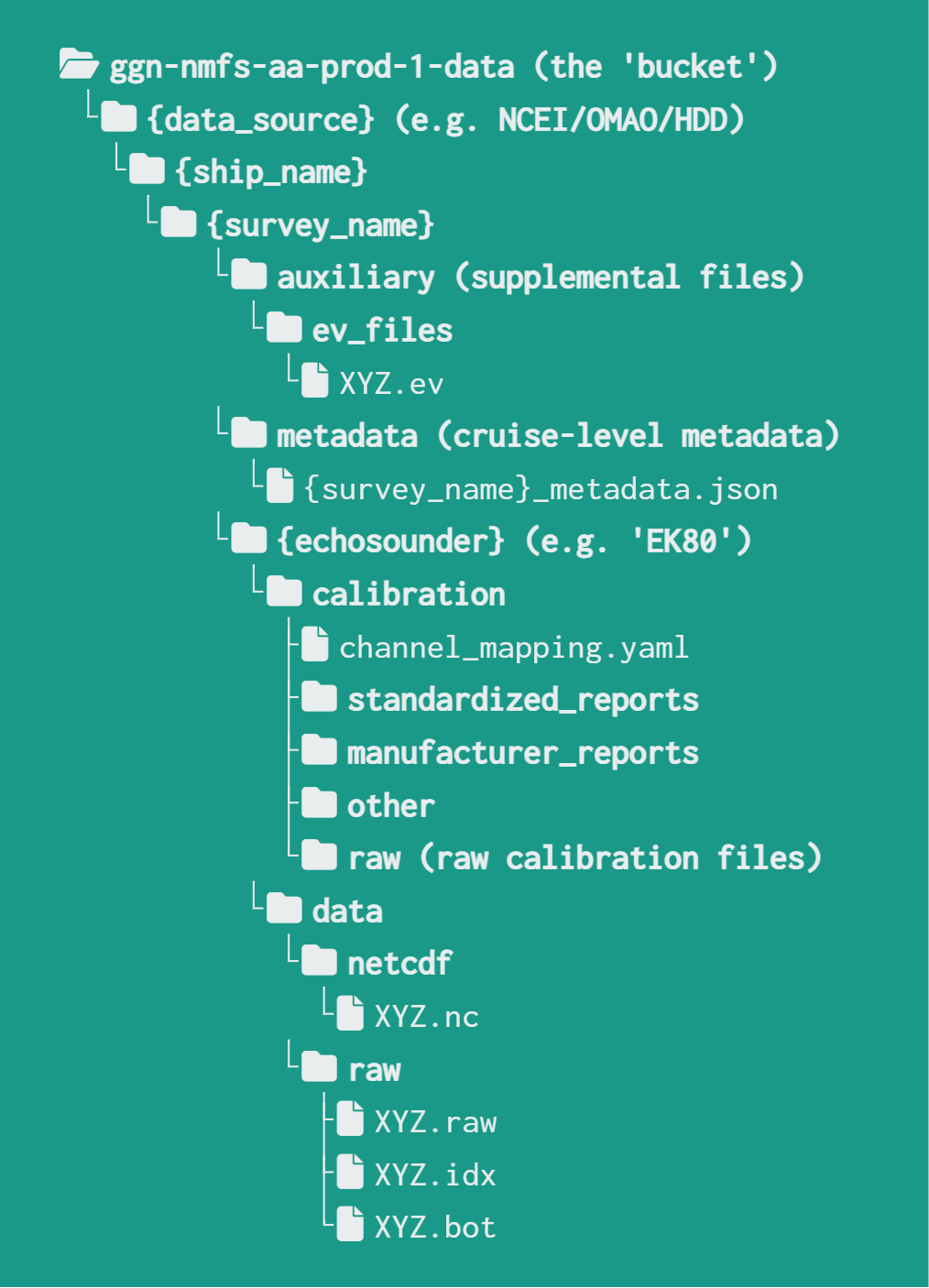
Below is the hierarchical layout for the production environment's storage bucket. This is the default environment used by AALibrary. As you can see, data is organized based on it's metadata. For example, any file relating to a specific survey will only exist within that survey's folder.
This also means that this layout has a 1:1 mapping of each file to its location in the storage bucket. This makes files easily searchable using AALibrary.
NOTE: On folder names
You can replace any parameter that is located within brackets {} with its appropriate name. For example, {survey_name} can be replaced with HB2407, and so on.
Dev Environment Layout
Below is the hierarchical layout for the development environment's storage bucket. As you can see, data is organized based on it's metadata. For example, any file relating to a specific survey will only exist within that survey's folder.
This also means that this layout has a 1:1 mapping of each file to its location in the storage bucket. This makes files easily searchable using AALibrary.
NOTE: On folder names
You can replace any parameter that is located within brackets {} with its appropriate name. For example, {survey_name} can be replaced with HB2407, and so on.

Transfer Appliance Layout
This storage bucket (ta_upload) exists within the production environment. The layout is different here compared to the other two storage buckets. There is a hierarchical order present, but instead of viewing /data_source/ as a storage entity, it is viewed as a Science Center (FMC) entity.
There are two layouts possible here. The first refers to a similar layout that we have in the other storage buckets. This is ideally the layout we would like to reach as a strategic initiative.
NOTE: On folder names
You can replace any parameter that is located within brackets {} with its appropriate name. For example, {science_center} can be replaced with NEFSC, and so on.
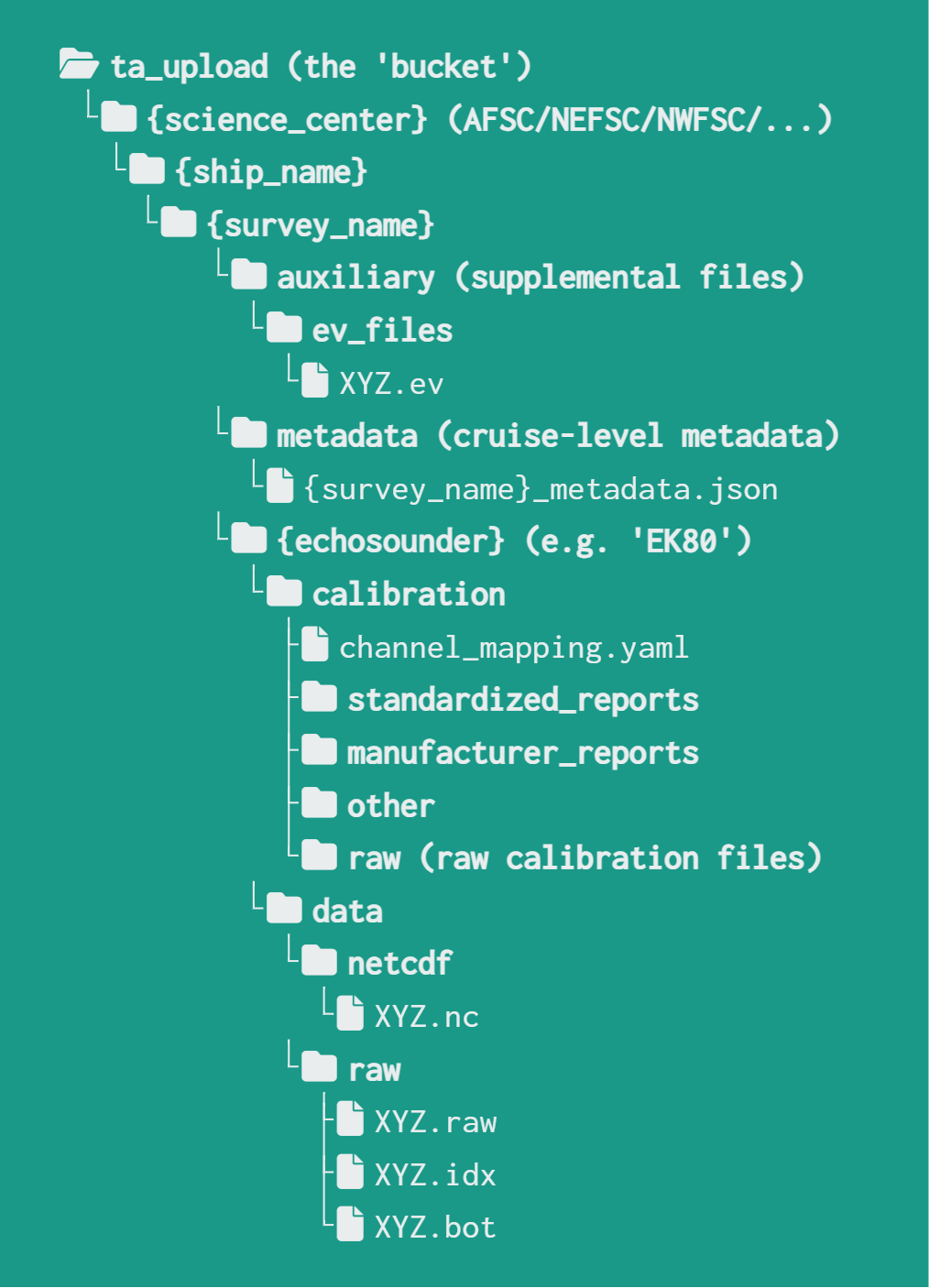
The second layout is dealer's choice. This means that the organization of the folders within this layout is dependent on the FMC that is uploading data. Keep in mind, our goal is to upload all of the data to the cloud, so organization and file naming conventions can be corrected after the upload is done.

File Naming Conventions
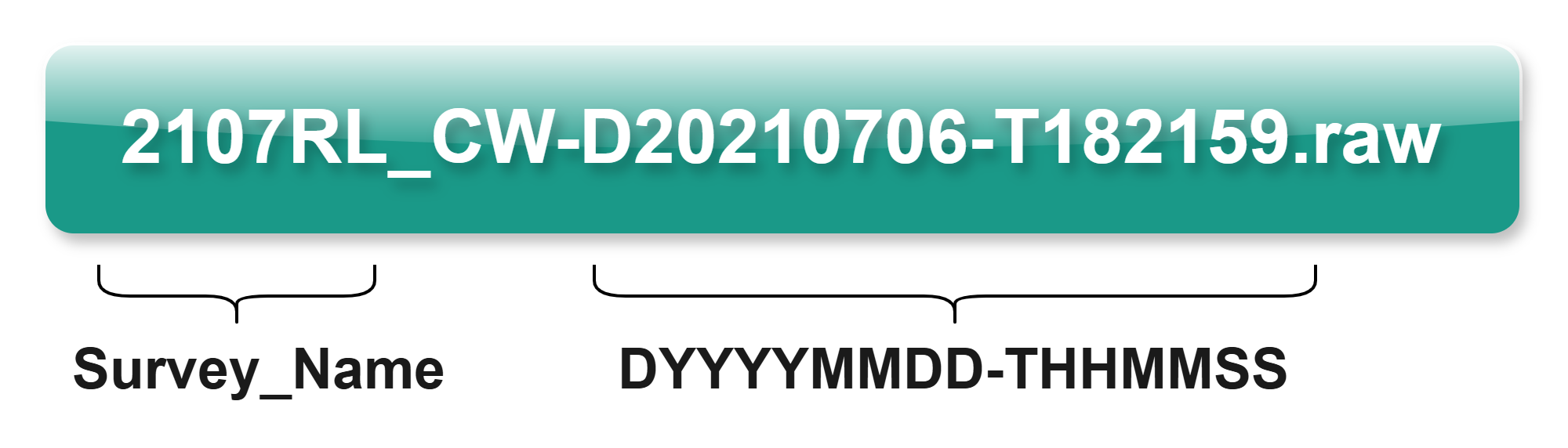
There are certain file naming conventions that we are trying to normalize here at AASI. For reference, here are the file naming conventions that our storage buckets follow:
- Files should start with with the Survey_Name
- Files should end with the DateTime string:
- Hours should be in Military time
- Applies to Kongsberg echosounder files, other files may use other naming conventions
Metadata Database
We have a metadata database that can hold the same Tugboat metadata for enhanced usage through the AALibrary. (e.g. searching/retrieving files from March 26th, 2024). Coriolix Metadata is planned to be added, as more of it becomes available. If you would like access to the metadata DB, please see the permissions page.
Derived Products
Derived products are work products produced through analysis of raw files. These are stored in their own directory in GCP. More information can be found on the derived products doc.
Cruisepack
Older CruisePack files can be uploaded to GCP storage using this script. The data that is uploaded can then be parsed and uploaded to the BigQuery Metadata Database using the following script. This is an important part of cloud migration, as it stores historical CruisePack data in the cloud. However, this process cannot be automated, and must be completed by each FMC, by a user who has access to these files on their local (or network) drive.
To make the process of finding the CruisePack files easier, you can use a console tool with this command aa-cruisepack. More information can be found on the scripts page, reading the comments in the script, or running the command alone to get the help readout.